Data
This project uses a dataset which is available here.
1. Introduction
Version control repositories like CVS, Subversion or Git can be a real gold mine for software developers. They contain every change to the source code including the date (the "when"), the responsible developer (the "who"), as well as little message that describes the intention (the "what") of a change.

In this notebook, I will analyze the evolution of a very famous open-source project – the Linux kernel. The Linux kernel is the heart of some Linux distributions like Debian, Ubuntu or CentOS.
We get some first insights into the work of the development efforts by
- identifying the TOP 10 contributors and
- visualizing the commits over the years.
Linus Torvalds, the (spoiler alert!) main contributor to the Linux kernel (and also the creator of Git), created a mirror of the Linux repository on GitHub. It contains the complete history of kernel development for the last 13 years.
For my analysis, I will use a Git log file with the following content:
# Printing the content of git_log_excerpt.csv
with open('datasets/git_log_excerpt.csv','r') as file:
    print(file.read())
1502382966#Linus Torvalds
1501368308#Max Gurtovoy
1501625560#James Smart
1501625559#James Smart
1500568442#Martin Wilck
1502273719#Xin Long
1502278684#Nikolay Borisov
1502238384#Girish Moodalbail
1502228709#Florian Fainelli
1502223836#Jon Paul Maloy
2. Reading in the dataset
The dataset was created by using the command git log --encoding=latin-1 --pretty="%at#%aN". The latin-1 encoded text output was saved in a header-less csv file. In this file, each row is a commit entry with the following information:
-
timestamp: the time of the commit as a UNIX timestamp in seconds since 1970-01-01 00:00:00 (Git log placeholder "%at") -
author: the name of the author that performed the commit (Git log placeholder "%aN")
The columns are separated by the number sign #. The complete dataset is in the datasets/ directory. It is a gz-compressed csv file named git_log.gz.
# Loading in the pandas module
import pandas as pd
# Reading in the log file
git_log = pd.read_csv('datasets/git_log.gz',names =['timestamp','author'],encoding='latin-1',sep='#',header=None)

# Printing out the first 5 rows
print(git_log.head())
    timestamp          author
0  1502826583  Linus Torvalds
1  1501749089   Adrian Hunter
2  1501749088   Adrian Hunter
3  1501882480       Kees Cook
4  1497271395       Rob Clark
3. Getting an overview
The dataset contains the information about every single code contribution (a "commit") to the Linux kernel over the last 13 years. We'll first take a look at the number of authors and their commits to the repository.
# calculating number of commits
number_of_commits = len(git_log.index) #git_log.shape[0]

# calculating number of authors
number_of_authors = git_log['author'].nunique()
#number_of_authors = git_log['author'].drop_duplicates().dropna().count()

# printing out the results
print("%s authors committed %s code changes." % (number_of_authors, number_of_commits))
17385 authors committed 699071 code changes.
4. Finding the TOP 10 contributors
There are some very important people that changed the Linux kernel very often. To see if there are any bottlenecks, we take a look at the TOP 10 authors with the most commits.
# Identifying the top 10 authors
top_10_authors = git_log.author.value_counts()[:10]

# Listing contents of 'top_10_authors'
top_10_authors
Linus Torvalds           23361
David S. Miller           9106
Mark Brown                6802
Takashi Iwai              6209
Al Viro                   6006
H Hartley Sweeten         5938
Ingo Molnar               5344
Mauro Carvalho Chehab     5204
Arnd Bergmann             4890
Greg Kroah-Hartman        4580
Name: author, dtype: int64
5. Wrangling the data
For my analysis, I want to visualize the contributions over time. For this, I use the information in the timestamp column to create a time series-based column.
# converting the timestamp column
git_log['timestamp'] = pd.to_datetime(git_log['timestamp'],unit='s')
# summarizing the converted timestamp column
git_log.timestamp.describe()
count                  699071
unique                 668448
top       2008-09-04 05:30:19
freq                       99
first     1970-01-01 00:00:01
last      2037-04-25 08:08:26
Name: timestamp, dtype: object
6. Treating wrong timestamps
As we can see from the results above, some contributors had their operating system's time incorrectly set when they committed to the repository. We'll clean up the timestamp column by dropping the rows with the incorrect timestamps.
# determining the first real commit timestamp
first_commit_timestamp = git_log.query('author == "Linus Torvalds"')['timestamp'].min()

# determining the last sensible commit timestamp
last_commit_timestamp = pd.to_datetime('now').strftime('%Y-%m-%d %H:%M:%S')

# filtering out wrong timestamps
corrected_log = git_log.query('timestamp >= @first_commit_timestamp & timestamp <= @last_commit_timestamp')

# summarizing the corrected timestamp column

corrected_log.describe()
| timestamp | author | |
|---|---|---|
| count | 698569 | 698568 |
| unique | 667977 | 17375 |
| top | 2008-09-04 05:30:19 | Linus Torvalds |
| freq | 99 | 23361 |
| first | 2005-04-16 22:20:36 | NaN |
| last | 2017-10-03 12:57:00 | NaN |
7. Grouping commits per year
To find out how the development activity has increased over time, I'll group the commits by year and count them up.
# Counting the no. commits per year
#commits_per_year = corrected_log.resample('AS',on='timestamp').count()
commits_per_year = corrected_log.groupby(pd.Grouper(
        key='timestamp',
        freq='AS'
        )
    )['timestamp','author'].count()
# Listing the first rows
commits_per_year.head()
| timestamp | author | |
|---|---|---|
| timestamp | ||
| 2005-01-01 | 16230 | 16229 |
| 2006-01-01 | 29255 | 29255 |
| 2007-01-01 | 33759 | 33759 |
| 2008-01-01 | 48847 | 48847 |
| 2009-01-01 | 52572 | 52572 |
8. Visualizing the history of Linux
Finally, I'll make a plot out of these counts to better see how the development effort on Linux has increased over the the last few years.
# Setting up plotting in Jupyter notebooks
%matplotlib inline

# plot the data
commits_per_year.plot(kind='bar',title='commits per year',legend=False)
<matplotlib.axes._subplots.AxesSubplot at 0x7f0abcf73358>
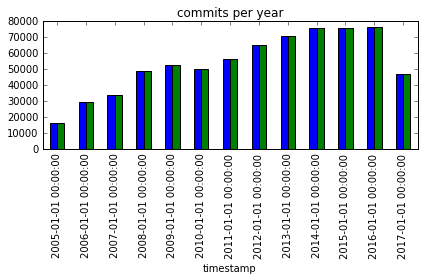
9. Conclusion
Thanks to the solid foundation and caretaking of Linux Torvalds, many other developers are now able to contribute to the Linux kernel as well. There is no decrease of development activity at sight!
# calculating or setting the year with the most commits to Linux
year_with_most_commits = commits_per_year.timestamp.idxmax(axis=0)
year_with_most_commits
Timestamp('2016-01-01 00:00:00', freq='AS-JAN')
Further Reading
If you are more interested in mining software repositories, take a look at the following books:
- Adam Tornhill: Software X-Ray. Pragmatic Programmers, 2018.
- Christian Bird, Tim Menzies, Thomas Zimmermann: The Art and Science of Analyzing Software Data. Morgan Kaufmann, 2015.
- Tim Menzies, Laurie Williams, Thomas Zimmermann: Perspectives on Data Science for Software Engineering. Morgan Kaufmann, 2016.
Reproducibility
Thanks to platforms like GitHub or SourceForge, it’s easy to analyze the evolution of software projects nowadays. E. g. for this exercise, I cloned the whole Git repository of Linux (~3.6 GB) from GitHub. I copied the repository onto my hard drive with
git clone https://github.com/torvalds/linux.git
and (after a few minutes of downloading) exported the history of the relevant information with
git log --encoding=latin-1 --pretty="%at#%aN"
that printed out the commit timestamp and the author. Be sure to set an encoding explicitly and to select a separator that doesn’t occur in the data.
Note: In rare cases, you’ll need to use a non-printable character as separator. I found the “DEVICE CONTROL TWO” Unicode character U+0012 very useful for this purpose.
Next Steps
There are many more parameters you can use with the –pretty option of git log. Have a look at the Git documentation for more details.
If you want to know more about the Linux kernel development in general, you can dive into the official documentation and start contributing to one of the most biggest open-source projects ever! :-)
Dig deeper?
You can find out more about this project at Github.